 4162388c37
Added docker and docker-compose to README to avoid people creating issues for docker-compose related issues
84 lines
3.4 KiB
Markdown
84 lines
3.4 KiB
Markdown
<p align="center">
|
|
<img src="https://raw.githubusercontent.com/filebrowser/logo/master/banner.png" width="550"/>
|
|
</p>
|
|
|
|
|
|
|
|
[](https://github.com/filebrowser/filebrowser/actions/workflows/main.yaml)
|
|
[](https://goreportcard.com/report/github.com/filebrowser/filebrowser)
|
|
[](http://godoc.org/github.com/filebrowser/filebrowser)
|
|
[](https://github.com/filebrowser/filebrowser/releases/latest)
|
|
[](http://webchat.freenode.net/?channels=%23filebrowser)
|
|
|
|
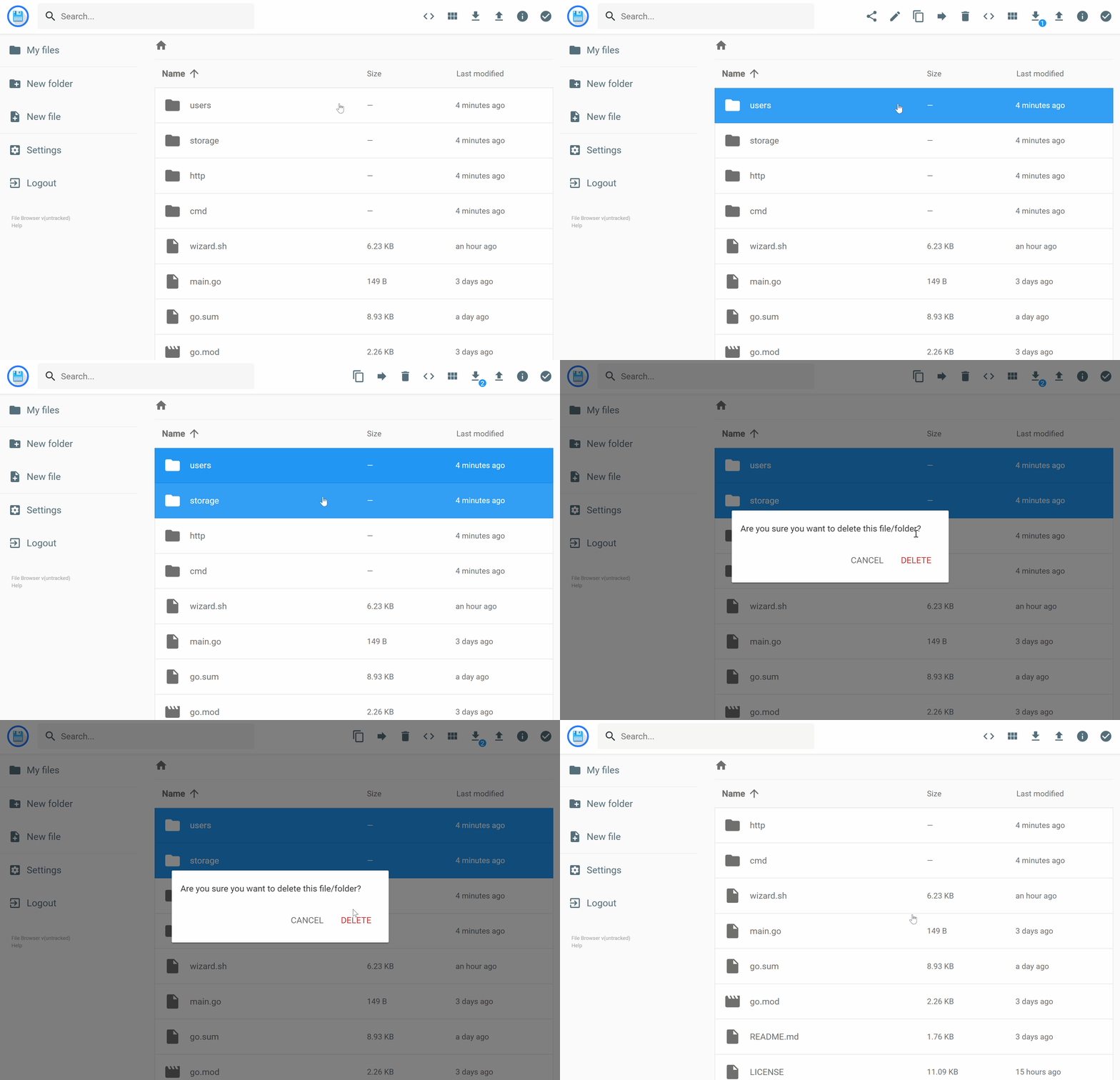
filebrowser provides a file managing interface within a specified directory and it can be used to upload, delete, preview, rename and edit your files. It allows the creation of multiple users and each user can have its own directory. It can be used as a standalone app or as a middleware.
|
|
|
|
## Features
|
|
|
|
Please refer to our docs at [https://filebrowser.org/features](https://filebrowser.org/features)
|
|
|
|
## Install
|
|
|
|
For installation instructions please refer to our docs at [https://filebrowser.org/installation](https://filebrowser.org/installation).
|
|
|
|
##Docker
|
|
```bash
|
|
docker run \
|
|
-v /path/to/root:/srv \
|
|
-v /path/filebrowser.db:/database.db \
|
|
-v /path/.filebrowser.json:/.filebrowser.json \
|
|
--user $(id -u):$(id -g)
|
|
-p 80:80 \
|
|
filebrowser/filebrowser
|
|
```
|
|
|
|
## Docker-compose
|
|
First of all, create to 2 needed files before running docker-compose
|
|
|
|
* /local/path/to/database.db
|
|
* /local/path/to/.filebrowser.json
|
|
|
|
The **.filebrowser.json** contains your configuration.
|
|
The context of the settings in this file is in reference to the docker container, and does should not reflect your local environment.
|
|
|
|
```json
|
|
{
|
|
"port": 80,
|
|
"baseURL": "",
|
|
"address": "",
|
|
"log": "stdout",
|
|
"database": "/database.db",
|
|
"root": "/srv"
|
|
}
|
|
```
|
|
Next you bring the docker container up with a similar docker-compose.yml file:
|
|
|
|
```yml
|
|
version: '3.3'
|
|
services:
|
|
filebrowser:
|
|
volumes:
|
|
- '/local/path/to/shares:/srv'
|
|
- '/local/path/to/database.db:/database.db'
|
|
- '/local/path/to/.filebrowser.json:/.filebrowser.json:ro'
|
|
ports:
|
|
- '80:80'
|
|
image: filebrowser/filebrowser
|
|
```
|
|
|
|
``` bash
|
|
docker-compose up --build
|
|
```
|
|
|
|
|
|
## Configuration
|
|
|
|
[Authentication Method](https://filebrowser.org/configuration/authentication-method) - You can change the way the user authenticates with the filebrowser server
|
|
|
|
[Command Runner](https://filebrowser.org/configuration/command-runner) - The command runner is a feature that enables you to execute any shell command you want before or after a certain event.
|
|
|
|
[Custom Branding](https://filebrowser.org/configuration/custom-branding) - You can customize your File Browser installation by change its name to any other you want, by adding a global custom style sheet and by using your own logotype if you want.
|
|
|
|
## Contributing
|
|
|
|
If you're interested in contributing to this project, our docs are best places to start [https://filebrowser.org/contributing](https://filebrowser.org/contributing).
|